
Need a hand getting started?, join our Discord server and open a Support Ticket, choose “Tutorial Related,” and we will be happy to help .
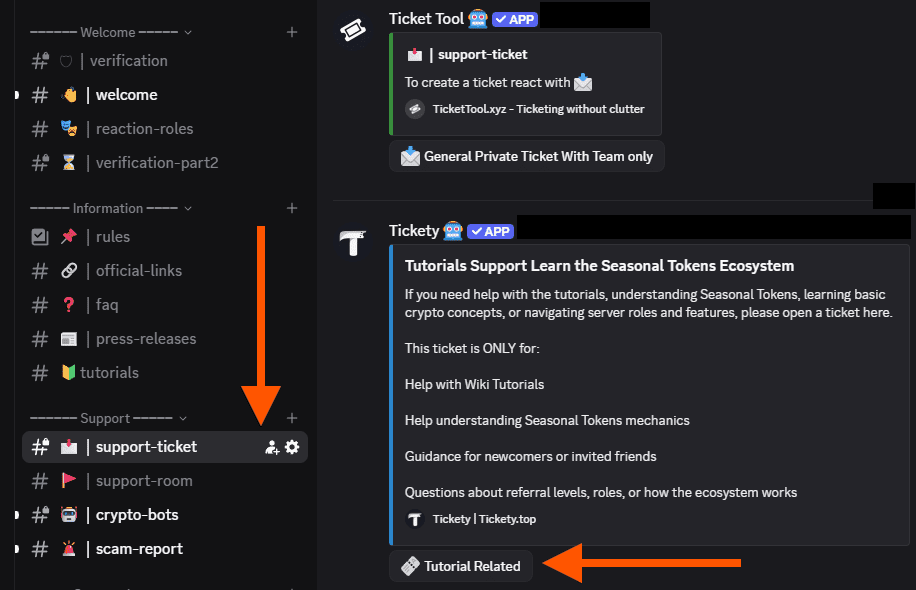
If you are not a Discord user, press Preview Our Discord to check it out.

Why Discord?
Because Discord is an optional, private community space—not a public social network.
No feeds, no algorithms, no “followers”—just a place to ask questions, get help fast, and stay updated when you want to.
Discord is used by everything from open-source communities to large companies—as a private, opt-in space for support and collaboration, not a social media feed.
Getting Started with Discord
Follow these steps to join the Seasonal Tokens community on Discord.
1 Create a Discord Account
2 Install the Discord App
3 Join the Discord Server
4 Verify Your Account
To keep bots outside, users have to verify they are human.
And now you can create that support ticket! and you have to join Discord only once! 😉